New Modern Webkit-based Browser In Development
  • MorphOS Developer
    jacadcaps
    Posts: 3339 from 2003/3/5
    From: Canada
    Odyssey does not have Media Source support. I suggest you disable it if you're having issues with buffer underruns.
  • »19.04.21 - 14:49
    Profile Visit Website
  • Paladin of the Pegasos
    Paladin of the Pegasos
    Amigaharry2
    Posts: 1392 from 2010/1/6
    From: EU-Austria (Wien)
    How does OWB prelod then the whole video?

    Here you can see what I mean:
    When stopping the video, OWB loads continuosly the whole video (Wayfarer stops loading). After that even a PEG2 is able to play it in window-mode....... (seems download sucks much cpu-load)

    41014724lu.jpeg
    Peg2, 3xPowerMac G5, 2xPowerbookG4, 2x MacMiniG4, Efika (again), A3000T and life is never boring.....
  • »19.04.21 - 14:40
    Profile
  • MorphOS Developer
    jacadcaps
    Posts: 3339 from 2003/3/5
    From: Canada
    Quote:

    Amigaharry2 wrote:
    YT: Is there any posibility to increase the stream-cache a bit? Playback paused sometimes to load (longer videos). This does'nt occur in OWB or Mplayer - downloadspeed is much higher than playbackspeed.


    No, it isn't something I can control. With Media Source, the buffers are supplied by the website's JavaScript code.
  • »19.04.21 - 14:14
    Profile Visit Website
  • Paladin of the Pegasos
    Paladin of the Pegasos
    Amigaharry2
    Posts: 1392 from 2010/1/6
    From: EU-Austria (Wien)
    YT: Is there any posibility to increase the stream-cache a bit? Playback paused sometimes to load (longer videos). This does'nt occur in OWB or Mplayer - downloadspeed is much higher than playbackspeed.
    Peg2, 3xPowerMac G5, 2xPowerbookG4, 2x MacMiniG4, Efika (again), A3000T and life is never boring.....
  • »19.04.21 - 06:08
    Profile
  • Paladin of the Pegasos
    Paladin of the Pegasos
    NewSense
    Posts: 1619 from 2012/11/9
    From: Manchester, UK/GB
    Quote:

    jacadcaps wrote: Does it fail to start after a reboot?

    Not sure what you mean exactly. If I reboot and then launch Wayfarer, after I've re-installed it completely then it works OK.

    I should also mention that I do not run/launch Wayfarer off/from a SFS partition, it runs from a USB FAT32L partition, as it has done since the early releases of Wayfarer, say from about v1.4 - without any issues, other than those reported for the issues than those interim versions exhibited during their release date(s).
    Quote:

    jacadcaps wrote: Do run SFSDoctor.

    I cannot run it on the Wayfarer partition as it's a FAT partition, but the SYS: partition reports all OK - which is obviously where MOSSYS and the other SYS components are installed/run from.
    Quote:

    jacadcaps wrote: Also, try to get a Snoopium log from starting Wayfarer.

    I did, but when I run Snoopium, and then immediately afterwards start Wayfarer, the Wayfarer Ambient Splash loads, then it stalls, as does Snoopium, and eventually the system stalls/becomes inactive so I have to reboot, and I never get to save a Snoopium log or get Wayfarer to load - that also applies to v1.11 as well as v1.12, probably other earlier releases as well, but I haven't tried those, as yet, unless you think there is some benefit to be obtained by doing so.

    I have actually got a Snnopium and the SFS log files, so I will send you those by email, for you to see if there is anything in there to diagnose what the issue is, if any trouble is shown in that file.

    Currently Wayfarer v1.12 is running as it should and will play videos/audio as before, but sometimes it's unreliable, loading audio but not video, sometimes video but no audio, and if I load one video then a subsequent one on the same page won't load either at all, or one or the other audio or video components, as though the video/audio loader is not being released from the first file requested to play and allowed/forced to stop the first one and play the 2nd one requested by me, the user.
    MacMini 1.5GHz,64MB VRAM, PowerBooks A1138/9 (Model 5,8/9),PowerMac G5 2.3GHz(DP), iMac A1145 2.1GHz 20", all with MorphOS v3.20+,Airport,Bluetooth,A1016 Keyboard,T-RB22 Mouse,DVD-RW-DL,MiniMax,Firewire/USB2 & MacOSX 10.4/5
  • »18.04.21 - 22:20
    Profile
  • Butterfly
    Butterfly
    Posts: 81 from 2020/5/1
    Looking forward to try the next version with Youtube-support for non-altivec machines (X5000, Sam460 etc.).
  • »18.04.21 - 17:01
    Profile
  • Cocoon
    Cocoon
    Posts: 43 from 2021/4/18
    Logging to "Protonmail" (old.prrotonmail.com) does not seem to work with Wayfarer... After giving password the 'wait' indicator on the login screen rolls a few seconds, then it stops and Wayfarer freezes, as well as the whole system. Only way out is to press reset button.

    I also tested the different spoofing options but without success. Has anyone else tested this...? Any suggestions? It is possble to create a free mail account on that site.
  • »18.04.21 - 14:38
    Profile
  • MorphOS Developer
    jacadcaps
    Posts: 3339 from 2003/3/5
    From: Canada
    Quote:

    NewSense wrote:
    [Update] - just had to re-install Wayfarer v1.12 yet again with a fresh installation


    Does it fail to start after a reboot? Do run SFSDoctor. Also, try to get a Snoopium log from starting Wayfarer.
  • »18.04.21 - 08:46
    Profile Visit Website
  • MorphOS Developer
    jacadcaps
    Posts: 3339 from 2003/3/5
    From: Canada
    Quote:

    Renoir wrote:
    Should Youtube videos work also in X5000, or is running them one way or another Altivec dependent in Wayfarer...?


    Yes, it looks like ffmpeg does not work without Altivec right now. I'll see what I can do in future versions.
  • »18.04.21 - 08:45
    Profile Visit Website
  • Order of the Butterfly
    Order of the Butterfly
    vulture
    Posts: 198 from 2008/2/4
    From: Greece
    Works fine here! Only thing I've noticed, if screen saver runs and returns to desktop, screen is black and reloading won't help to get video back, it needs to restart wayfarer.
  • »18.04.21 - 07:52
    Profile
  • Paladin of the Pegasos
    Paladin of the Pegasos
    Amigaharry2
    Posts: 1392 from 2010/1/6
    From: EU-Austria (Wien)
    I'm impressed! Runs on PEG2/1GHz (360p) flawless with about 60% CPU-load........
    Peg2, 3xPowerMac G5, 2xPowerbookG4, 2x MacMiniG4, Efika (again), A3000T and life is never boring.....
  • »18.04.21 - 07:41
    Profile
  • Priest of the Order of the Butterfly
    Priest of the Order of the Butterfly
    analogkid
    Posts: 724 from 2004/11/3
    From: near myself
    Ok, I tried 720p Youtube on a Mac mini 1,25 GHz. Of course with some stutter here and there, but very usable at 70% cpu load. And no problem on a G5, too. Very impressive.

    [ Edited by analogkid 18.04.2021 - 12:02 ]
  • »18.04.21 - 07:22
    Profile
  • Paladin of the Pegasos
    Paladin of the Pegasos
    Amigaharry2
    Posts: 1392 from 2010/1/6
    From: EU-Austria (Wien)
    @jacadcaps:
    Spoofing to Safari/Ipad solved the problem in my case! Works now fine (even at 1080p)!! Cpu-load mostly below 50%.
    Only german catalogfile has an issue: Media-Menue is'nt displayed correct.
    Thank you for hints!


    Btw: Why does'nt it play this embedded video (https://orf.at/stories/3209563/)? Shows "still-pictures" only, and sound is played)

    [ Editiert durch Amigaharry2 18.04.2021 - 10:12 ]
    Peg2, 3xPowerMac G5, 2xPowerbookG4, 2x MacMiniG4, Efika (again), A3000T and life is never boring.....
  • »18.04.21 - 05:56
    Profile
  • Acolyte of the Butterfly
    Acolyte of the Butterfly
    Mozzerfan
    Posts: 105 from 2016/10/5
    Quote:

    Renoir wrote:
    Should Youtube videos work also in X5000, or is running them one way or another Altivec dependent in Wayfarer...? In my machine Wf crashes as soon as I try to open a video ("Wayfarer Crash Handler / It looks like Wayfarer has crashed :( ..."). I have chosen the items recommended here from preferences.


    I have the same problem with my sam460ex (with radeon x1550).
  • »18.04.21 - 04:35
    Profile
  • Cocoon
    Cocoon
    Posts: 43 from 2021/4/18
    Should Youtube videos work also in X5000, or is running them one way or another Altivec dependent in Wayfarer...? In my machine Wf crashes as soon as I try to open a video ("Wayfarer Crash Handler / It looks like Wayfarer has crashed :( ..."). I have chosen the items recommended here from preferences.
  • »18.04.21 - 03:48
    Profile
  • Paladin of the Pegasos
    Paladin of the Pegasos
    NewSense
    Posts: 1619 from 2012/11/9
    From: Manchester, UK/GB
    Quote:

    jacadcaps wrote: I'd start by running SFSDoctor on your partitions. Certainly not an error I've seen before - especially since nothing in Wayfarer uses clang.

    I knew I shouldn't have used that word "clang" - it's just the best way to describe the sound effect I have for a system fail noise, it's not a bell sound it's more of a "clang" sound - so you know something went wrong, but not a glass-smashing sound as some users use I suppose.

    Anyway, I just deleted the old(er) folder and replaced it with a new installation and all is OK again, and the video files are playing once more, and the video is quite fluid/continuous, so that's quite good for a 1.5GHz MacMini G4 - and/or your video implementation! 8-)

    [Update] - just had to re-install Wayfarer v1.12 yet again with a fresh installation as I got an "error" sound on startup yet again, and videos/audio don't work in Wayfarer v1.12 anymore with that installation (fixed with re-installing) but playing/attempting to play another video also generated a Wayfarer Crash Log -> sent. :-(
    MacMini 1.5GHz,64MB VRAM, PowerBooks A1138/9 (Model 5,8/9),PowerMac G5 2.3GHz(DP), iMac A1145 2.1GHz 20", all with MorphOS v3.20+,Airport,Bluetooth,A1016 Keyboard,T-RB22 Mouse,DVD-RW-DL,MiniMax,Firewire/USB2 & MacOSX 10.4/5
  • »18.04.21 - 00:22
    Profile
  • MorphOS Developer
    jacadcaps
    Posts: 3339 from 2003/3/5
    From: Canada
    I'd start by running SFSDoctor on your partitions. Certainly not an error I've seen before - especially since nothing in Wayfarer uses clang.
  • »17.04.21 - 23:54
    Profile Visit Website
  • Paladin of the Pegasos
    Paladin of the Pegasos
    NewSense
    Posts: 1619 from 2012/11/9
    From: Manchester, UK/GB
    @ jacadcaps - I initially could get the video to run OK on Formula1.com, in fact better in full screen mode, rather than in the webpage window and that's with the MacMini, so I got some good results for a too-slow system it seems.

    Anyway, after having to reboot, following Wayfarer failing to load-up after quitting to free-up system RAM I now get a system "error clang" when I try to load up Wayfarer v1.12 - which never happened with v1.11, and the videos just don't load, only the audio.

    Any idea what's gone wrong? Could it be something in the Wayfarer folders that is affecting it starting up correctly? :-?

    If I load up v1.11 as before I get it to load without any "error clang" it loads normally, and works as it did before, just no video playback.
    MacMini 1.5GHz,64MB VRAM, PowerBooks A1138/9 (Model 5,8/9),PowerMac G5 2.3GHz(DP), iMac A1145 2.1GHz 20", all with MorphOS v3.20+,Airport,Bluetooth,A1016 Keyboard,T-RB22 Mouse,DVD-RW-DL,MiniMax,Firewire/USB2 & MacOSX 10.4/5
  • »17.04.21 - 23:42
    Profile
  • MorphOS Developer
    jacadcaps
    Posts: 3339 from 2003/3/5
    From: Canada
    NewSense, a 1.5GHz mini is simply too slow for this website - it only serves 720p+ and no lower qualities. You're about 1GHz short.

    K-L, https://video.triplea.fr is trying to play HLS in JavaScript... I'll need to investigate what it does and what I have to do to make it work (if it's even possible). For now the focus is on YT.

    [ Edited by jacadcaps 18.04.2021 - 03:44 ]
  • »17.04.21 - 23:34
    Profile Visit Website
  • Paladin of the Pegasos
    Paladin of the Pegasos
    NewSense
    Posts: 1619 from 2012/11/9
    From: Manchester, UK/GB
    OK, so we've got some video displays now in Wayfarer - great work, major achievement for us all.

    On Formula1.com if I select a current page - Formula1.com - Lando Norris's Regret ... then I can load up the first video, as long as MSE and VP9 codec options are enabled, and I've tried just a few options in the "Deblocking filter" list to see if I can get a better video of that page.

    Initially I got a side-by-side video, a sort of Picture-In-Picture display, of the video squashed into the frame as though 2 versions of the video were running parallel to one another in sync/same time-frame, but with no audio. So, I reloaded the page and then got audio and video, though there was some stuttering (MacMini 1.5GHz) but more tweaking of the "Deblocking filter" allows better, more fluid/continuous - no/less stuttering, video/audio.

    However, on that page there is a second video of an interview of the driver, and it seems that once the first video/audio has been triggered it does not load up the audio or video for the second video without a complete reload of the page.

    I also cannot get a video to pause as such, the audio or video or both just keep running on, and then loop sometimes so there is little control over a video once it's been started, and you cannot play it back without a full reload, and the RAM gets eaten into in a big way for buffering the video, which doesn't release once a video page has been closed, some does but a large chunk of that RAM still remains locked into memory/RAM until the program is reloaded it seems.

    Others may have other observations on such features, but those are mine for the moment.
    MacMini 1.5GHz,64MB VRAM, PowerBooks A1138/9 (Model 5,8/9),PowerMac G5 2.3GHz(DP), iMac A1145 2.1GHz 20", all with MorphOS v3.20+,Airport,Bluetooth,A1016 Keyboard,T-RB22 Mouse,DVD-RW-DL,MiniMax,Firewire/USB2 & MacOSX 10.4/5
  • »17.04.21 - 22:58
    Profile
  • K-L
  • Cocoon
    Cocoon
    K-L
    Posts: 46 from 2020/11/17
    From: Lyon, France
    Ok, I see, my bad :)

    I had deactivated automatic playing with any site in Wayfarer.

    It's ok now.

    I have some trouble with https://video.triplea.fr (our peertube) : the files are not not played fully (only the firt seconds). Maybe the HLS thing you were talking about previously.

    A little thing I noticed : when in FullScreen on a YT video, left and right sides are truncated.

    Good work !
    PowerMac G5 2,7 Ghz / Radeon 9650 / MorphOS 3.15
    AmigaOne X1000 (unused ATM)
  • »17.04.21 - 21:03
    Profile
  • MorphOS Developer
    jacadcaps
    Posts: 3339 from 2003/3/5
    From: Canada
  • »17.04.21 - 20:10
    Profile Visit Website
  • K-L
  • Cocoon
    Cocoon
    K-L
    Posts: 46 from 2020/11/17
    From: Lyon, France
    Thanks.

    Indeed, it shows loading forever (the rotating wheel on the play button).

    There is no "youtube.com" in settings (or I don't seem to find it), where is it hidden?

    I'll try to erase everything.
    PowerMac G5 2,7 Ghz / Radeon 9650 / MorphOS 3.15
    AmigaOne X1000 (unused ATM)
  • »17.04.21 - 19:57
    Profile
  • MorphOS Developer
    jacadcaps
    Posts: 3339 from 2003/3/5
    From: Canada
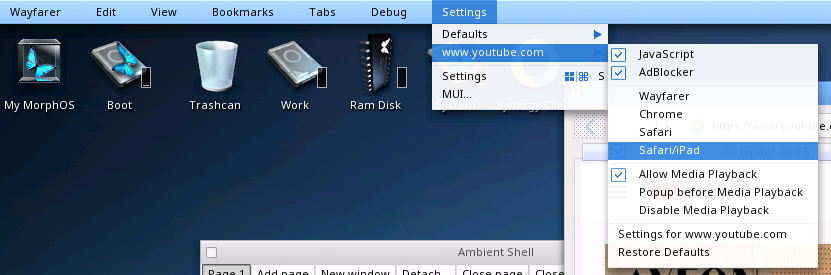
    Well, both of you aren't providing me with much details here. What fails? Do you see a YT error screen? Does it show loading forever? If it's the former: I'll be releasing 1.13 soon which makes it possible to disable HLS that Youtube started feeding to people in some locations (I cannot get MPEG-TS to work yet, sadly). If it's the latter, there's a few things you can do:

    - open the Settings menu, go to youtube.com submenu and make sure 'Allow Media Playback' is enabled. reload the page
    - change spoofing to iPad in the same menu
    - press pause & play again
    - quit Wayfarer, go to Applications/Wayfarer/Cache, delete Curl, Storage, __IndexedDB folders, try again
  • »17.04.21 - 19:35
    Profile Visit Website
  • Paladin of the Pegasos
    Paladin of the Pegasos
    Amigaharry2
    Posts: 1392 from 2010/1/6
    From: EU-Austria (Wien)
    Same here! Cannot play any video (G5, Radeon9600). YT-pages are loading very, very slow and CPU is most of the time on 100%.
    Peg2, 3xPowerMac G5, 2xPowerbookG4, 2x MacMiniG4, Efika (again), A3000T and life is never boring.....
  • »17.04.21 - 18:58
    Profile