New Modern Webkit-based Browser In Development
  • Paladin of the Pegasos
    Paladin of the Pegasos
    Amigaharry2
    Posts: 1392 from 2010/1/6
    From: EU-Austria (Wien)
    No chance to get YT running on this PB. When starting video first picture is shown, then it stops and does nothing. Tried to start it from a virgin MOS-Installation, spoofing as any browser possible - does'nt go at all!
    Put same installation/config to a Mini and the second PB: runs flawless......
    Peg2, 3xPowerMac G5, 2xPowerbookG4, 2x MacMiniG4, Efika (again), A3000T and life is never boring.....
  • »05.05.21 - 09:18
    Profile
  • IKE
  • Acolyte of the Butterfly
    Acolyte of the Butterfly
    IKE
    Posts: 150 from 2009/11/7
    From: Southern CA
    Ha! Sounds good! Thanks jacadcaps!
    IKE

    MacMini G4 1.5Ghz/PowerBook G4 1.67Ghz/PowerMac G5 2.0Ghz DP 7,2 Radeon 9650/256MB

    Join the conversation @ r/morphos
  • »04.05.21 - 23:26
    Profile Visit Website
  • MorphOS Developer
    jacadcaps
    Posts: 3339 from 2003/3/5
    From: Canada
    The difference must be in Wayfarer's media settings and or cookies then. The next version will hopefully simplify this by adding a million more confusing media options :)

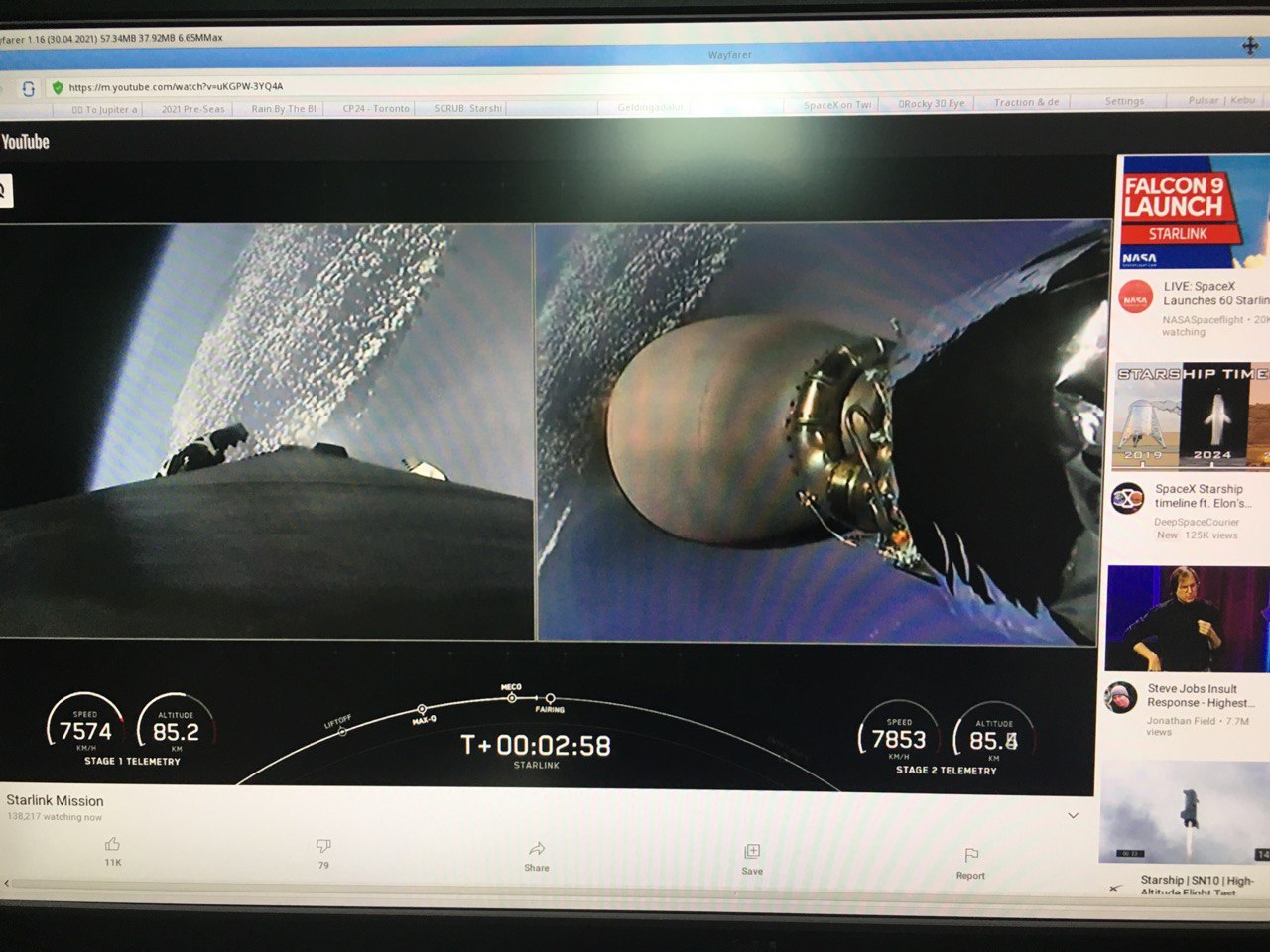
    In better news: got YT Live streams to play today. Sorry for poor quality of the shot.

  • »04.05.21 - 23:15
    Profile Visit Website
  • Paladin of the Pegasos
    Paladin of the Pegasos
    Amigaharry2
    Posts: 1392 from 2010/1/6
    From: EU-Austria (Wien)
    I've a very strange issue with a 17" Powerbook 5.7. (A1107). This PB is a "hybrid" with PB 5.9 (A1139). Its motherboard is from A1107, but has a 1680x1050 display (instead of regular 1440x900).
    Try to play YT-videos gives only the first picture of the movie, but then it does'nt start to play it! Nothing more happens!

    I use exact(!) the same config as on my second PB, which is a 15" PB 5,6. (A1106). On this PB there are no issues and YT-videos a played perfect.
    I copied complete Wayfarer-directory and put cgxvideo.library to Mossys:libs - so there is no difference in installation between this two PBs.
    Both are runing MOS 3.15 and have PPC 7447A/1.67GHz-CPUs with Altivec.

    Maybe interresting:
    I know that older MOS-versions do have driver-problems (Radeon) with this PB, so that a "special driver" was needed at that time (thanks to MOS-Team). Later versions of MOS does'nt have that issues any more.....can't remember when it switched - think it was MOS 3.10.........
    Peg2, 3xPowerMac G5, 2xPowerbookG4, 2x MacMiniG4, Efika (again), A3000T and life is never boring.....
  • »04.05.21 - 20:16
    Profile
  • MorphOS Developer
    jacadcaps
    Posts: 3339 from 2003/3/5
    From: Canada
    Quote:

    Cego wrote:
    Live streams on YT don't work. Any plans to support this? It would be nice if you could also give a short answer to my Proxy question. Thank you


    Yes, live streams need a bit of extra work. I do want to support them, eventually.

    Proxy isn't really on the todo. Perhaps if I have a little more spare time.
  • »02.05.21 - 00:28
    Profile Visit Website
  • Priest of the Order of the Butterfly
    Priest of the Order of the Butterfly
    Cego
    Posts: 739 from 2006/5/27
    From: Germany
    Live streams on YT don't work. Any plans to support this? It would be nice if you could also give a short answer to my Proxy question. Thank you
    Pegasos II G4 @1.0GHz, 1GB DDR Ram, Radeon 9200Pro, 240GB SSD+160GB HD, MorphOS 3.18, AmigaOS4.1 FE, Debian 8
  • »01.05.21 - 23:29
    Profile
  • MorphOS Developer
    jacadcaps
    Posts: 3339 from 2003/3/5
    From: Canada
    Quote:

    Renoir wrote:
    Radeon HD 5450 (1 GB).


    I am afraid you are out of luck - this card doesn't do overlay which is currently required. There's some plans for alt display mode but no ETA yet.
  • »01.05.21 - 17:25
    Profile Visit Website
  • MorphOS Developer
    zukow
    Posts: 662 from 2005/2/9
    From: Poland
    Probably overlay isnt supported in this card. Does MPlayer work in Overlay mode?
  • »01.05.21 - 16:41
    Profile Visit Website
  • Cocoon
    Cocoon
    Posts: 43 from 2021/4/18
    Quote:

    jacadcaps wrote:
    Quote:

    Renoir wrote:
    I tested v. 1.16 with X5000 but cannot get Youtube videos running... If I click the red/white start arrow on the video, I get just a black window.


    What graphics card do you use?


    Radeon HD 5450 (1 GB).
  • »01.05.21 - 15:27
    Profile
  • MorphOS Developer
    jacadcaps
    Posts: 3339 from 2003/3/5
    From: Canada
    Quote:

    Mozzerfan wrote:
    Are shoutcast mp3 radio stations supposed to work ?
    The play button on this site doesn't play anything.
    http://directory.shoutcast.com/


    Yes and it used to work. It seems that now this particular website doesn't work at all, not just in Wayfarer. I've tried it in Vivaldi and Safari and neither were able to play anything - the server request that's supposed to retrieve the MP3 stream address seems to be failing.
  • »01.05.21 - 14:56
    Profile Visit Website
  • MorphOS Developer
    jacadcaps
    Posts: 3339 from 2003/3/5
    From: Canada
    Quote:

    Renoir wrote:
    I tested v. 1.16 with X5000 but cannot get Youtube videos running... If I click the red/white start arrow on the video, I get just a black window.


    What graphics card do you use?
  • »01.05.21 - 14:24
    Profile Visit Website
  • Priest of the Order of the Butterfly
    Priest of the Order of the Butterfly
    ernsteiswuerfel
    Posts: 571 from 2015/6/17
    From: Funeralopolis
    Regarding youtube video formats... As far as I gather there are h264, vp9 and dav1d. vp9 seems 'standard' but does YT provide any video in any of these formats? Will this shift in the future?

    On PPC Linux vp9 is the most problematic. Quite some endian issues and it does net pass the testsuite at all on ppc. dav1d passed it's testsuite with ease on my G4 but is rather slow on the other hand, lacking Altivec optimizations. h264 fares quite well on ppc/x86/x86_64 but has lowest quality.
    PMac G5 11,2. PMac G4 3,6. PBook G4 5,8. [MorphOS 3.19 / Adelie Linux / Gentoo Linux] | A600GS [Amibench / OS 3.3] | Talos II Secure Workstation. [Gentoo Linux]
  • »01.05.21 - 08:53
    Profile
  • Cocoon
    Cocoon
    Posts: 43 from 2021/4/18
    I tested v. 1.16 with X5000 but cannot get Youtube videos running... If I click the red/white start arrow on the video, I get just a black window.

    I have Mediaplayback enabled, and have tested both with and without MSS. Spoofing is set to Safari/iPad. Are there any other settings which should be enabled or disabled? I have disk cache disabled (0MB) as I have 2 GB RAM.
  • »01.05.21 - 05:45
    Profile
  • Order of the Butterfly
    Order of the Butterfly
    igracki
    Posts: 471 from 2003/2/24
    From: Berlin
    Quote:

    K-L wrote:

    I'll revert to using Odyssey/YT.rexx with MPLayer for YouTube and still be using Wayfarer for usual surfing.


    You can also use YT.rexx with Wayfarer, if you have SmartClipboard.sbar installed.
    Then you just need to copy the url to the clipboard from context menu.
  • »01.05.21 - 05:42
    Profile Visit Website
  • K-L
  • Cocoon
    Cocoon
    K-L
    Posts: 46 from 2020/11/17
    From: Lyon, France
    Quote:

    jacadcaps a écrit :
    Make sure VP9 is off if YT is taking up too much CPU. You can set that in Settings > Media > VP9 codec support.


    VP9 is deactivated in prefs.

    Unfortunatley, YouTube experience using desktop version (not using Safari/iPad spoofing) is quite unusuable and playing medias from it is painfully slow : only sound with CPU toping at its max, when video finally starts it is jerky and 1/3 of the bottom is missing (I have to move the page to have the whole video appearing but it too much CPU intensive) and sometimes it finally crashes (bugreport sent).

    I'll revert to using Odyssey/YT.rexx with MPLayer for YouTube and still be using Wayfarer for usual surfing.
    PowerMac G5 2,7 Ghz / Radeon 9650 / MorphOS 3.15
    AmigaOne X1000 (unused ATM)
  • »01.05.21 - 04:30
    Profile
  • Paladin of the Pegasos
    Paladin of the Pegasos
    NewSense
    Posts: 1619 from 2012/11/9
    From: Manchester, UK/GB
    Quote:

    NewSense wrote: The crash showed the Acineralla video player had "Frozen". I cannot send the Crash report as it has locked up the whole requester save mechanism of the filesystem, even the Crash report failed to Send, so I am having to report this information via OWB v1.25.

    Quote:

    jacadcaps wrote: This is now fixed.

    I will download v1.16 and go from there, . . . and . . . I do appreciate all your considerable (understatement) efforts on Wayfarer, along with all the others involved in making/suggesting improvements.
    Quote:

    NewSense wrote: I know you said your focus is on YouTube, but I thought you should know about these sites as well, as Formula1.com is a mainstream worldwide accessible sport interest website ...]

    Quote:

    jacadcaps wrote: Formula1.com is too slow even on my 2.3GHz G5. It's serving very demanding high-bitrate streams. It won't work on a mini, period.

    I know you think that about formula1.com, but then why does it work OK with v1.12 on my 1.5GHz MacMini? :-?

    As videos load OK, and the video and audio work in sync and the video streams in quite a watchable way.
    MacMini 1.5GHz,64MB VRAM, PowerBooks A1138/9 (Model 5,8/9),PowerMac G5 2.3GHz(DP), iMac A1145 2.1GHz 20", all with MorphOS v3.20+,Airport,Bluetooth,A1016 Keyboard,T-RB22 Mouse,DVD-RW-DL,MiniMax,Firewire/USB2 & MacOSX 10.4/5
  • »30.04.21 - 23:53
    Profile
  • Acolyte of the Butterfly
    Acolyte of the Butterfly
    Mozzerfan
    Posts: 105 from 2016/10/5
    Jaca,

    Are shoutcast mp3 radio stations supposed to work ?

    The play button on this site doesn't play anything.
    http://directory.shoutcast.com/

    [ Edited by Mozzerfan 01.05.2021 - 03:46 ]
  • »30.04.21 - 23:43
    Profile
  • MorphOS Developer
    jacadcaps
    Posts: 3339 from 2003/3/5
    From: Canada
    Wayfarer 1.16 is now out. Fixes a crash in video decoder and disables screensaver when playing video.
  • »30.04.21 - 22:29
    Profile Visit Website
  • MorphOS Developer
    jacadcaps
    Posts: 3339 from 2003/3/5
    From: Canada
    Quote:

    NewSense wrote:
    The crash showed the Acineralla video player had "Frozen". I cannot send the Crash report as it has locked up the whole requester save mechanism of the filesystem, even the Crash report failed to Send, so I am having to report this information via OWB v1.25


    This is now fixed.

    Quote:

    I know you said your focus is on YouTube, but I thought you should know about these sites as well, as Formula1.com is a mainstream worldwide accessible sport interest website, and the BBC site is used a lot in the UK-GB.


    Formula1.com is too slow even on my 2.3GHz G5. It's serving very demanding high-bitrate streams. It won't work on a mini, period.
  • »30.04.21 - 22:28
    Profile Visit Website
  • MorphOS Developer
    jacadcaps
    Posts: 3339 from 2003/3/5
    From: Canada
    Make sure VP9 is off if YT is taking up too much CPU. You can set that in Settings > Media > VP9 codec support.

    [ Edited by jacadcaps 01.05.2021 - 02:35 ]
  • »30.04.21 - 21:46
    Profile Visit Website
  • Yokemate of Keyboards
    Yokemate of Keyboards
    Zylesea
    Posts: 2095 from 2003/6/4
    Wow - quite much more is working now: videos on n-tv,de, the zdf.de mediathek (albeit too slow!). Really nice, but we need more cpu grunt...
    --
    http://via.bckrs.de

    Whenever you're sad just remember the world is 4.543 billion years old and you somehow managed to exist at the same time as David Bowie.
    ...and Matthias , my friend - RIP
  • »30.04.21 - 20:56
    Profile Visit Website
  • Order of the Butterfly
    Order of the Butterfly
    Zetec-s
    Posts: 198 from 2008/7/10
    From: Cheshire, UK
    Firstly thanks for another update.

    I've just installed it on my G5 and initial impressions are that its not as responsive as 1.14.

    I've had the same issue that most videos only want to run at 360p on YT when spoofing as iPad, whilst when I spoof as something else the whole experience slows down.

    I've reverted to 1.14 and it definitely loads video quicker and seems less processor intensive (although I haven't looked in detail).

    [ Edited by Zetec-s 30.04.2021 - 23:42 ]
    PowerMac G5 Quad 2.5Ghz/2GB MorphOS 3.18 Registered
    Powerbook 1.67Ghz/1.5GB MorphOS 3.18 Registered
    MacMini 1.5Ghz/1GB MorphOS 3.18 Registered
    Efika 5200B 400Mhz/128MB MorphOS 2.3 Registered
  • »30.04.21 - 20:36
    Profile
  • Paladin of the Pegasos
    Paladin of the Pegasos
    NewSense
    Posts: 1619 from 2012/11/9
    From: Manchester, UK/GB
    Off to not so good a great start with v1.15 - tried formula1.com - all options tried have failed to load any video. Audio works OK on audio files (Team Radio), but the video play only gets to click on the "Play" triangle, then I get a continuous "loop loading" graphic (commonly used for most websites), and no video.

    Just tried BBC iPlayer and as the video started to load, after the Media file (audio) download request, then Wayfarer "Crashed" - that's my first try with v1.15, sadly there does not seem to be any improvement with this version compared to v1.12 when video worked better, well it actually displayed a video with sound, on formula1.com, and v1.12 also worked better on iPlayer than v1.15 - thus far. I'll keep testing/updating, probably via Crash reports, sadly.

    The crash showed the Acineralla video player had "Frozen". I cannot send the Crash report as it has locked up the whole requester save mechanism of the filesystem, even the Crash report failed to Send, so I am having to report this information via OWB v1.25

    I know you said your focus is on YouTube, but I thought you should know about these sites as well, as Formula1.com is a mainstream worldwide accessible sport interest website, and the BBC site is used a lot in the UK-GB.
    MacMini 1.5GHz,64MB VRAM, PowerBooks A1138/9 (Model 5,8/9),PowerMac G5 2.3GHz(DP), iMac A1145 2.1GHz 20", all with MorphOS v3.20+,Airport,Bluetooth,A1016 Keyboard,T-RB22 Mouse,DVD-RW-DL,MiniMax,Firewire/USB2 & MacOSX 10.4/5
  • »30.04.21 - 20:31
    Profile
  • K-L
  • Cocoon
    Cocoon
    K-L
    Posts: 46 from 2020/11/17
    From: Lyon, France
    Quote:

    jacadcaps a écrit :
    Spoof as something else, enable Media Source.


    Ah. Some time ago, we were told to spoof as iPad. So did I. I'll try to spoof as a much slower browser.

    Media Source is already enabled.

    Edited : I spoofed as Safari, which loads the way heavier desktop version of YouTube. Video can be played in 720p but everything is too slow (YouTube website loading, playing video which uses a lot more CPU than it used to with the iPad version, videos struggling to start ot not displaying, and so on...).

    Too bad:I deleted the 1.14 version of WayFarer. Otherwise I would have reverted to this one since i could play 720p YT videos in a really smooth way thanks to Safari/iPad spoofing. Desktop version of YouTube is too huge, even for a G5 at 2,7 Ghz and playing video has once again become really painful.


    [ Edité par K-L 01.05.2021 - 00:17 ]
    PowerMac G5 2,7 Ghz / Radeon 9650 / MorphOS 3.15
    AmigaOne X1000 (unused ATM)
  • »30.04.21 - 19:49
    Profile
  • Priest of the Order of the Butterfly
    Priest of the Order of the Butterfly
    Cego
    Posts: 739 from 2006/5/27
    From: Germany
    any plans on supporting Proxy?
    Pegasos II G4 @1.0GHz, 1GB DDR Ram, Radeon 9200Pro, 240GB SSD+160GB HD, MorphOS 3.18, AmigaOS4.1 FE, Debian 8
  • »30.04.21 - 18:03
    Profile