The internet connection is not working
  • Just looking around
    Posts: 10 from 2025/1/5
    I tried connecting a network cable to my PowerMac G5, but I couldn't establish a connection. I tried automatic dhcp configuration and manually setting IP addresses, but nothing happens. I have no idea if the computer port is working or how to check it, but here's what my router and system settings look like
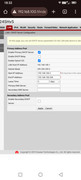
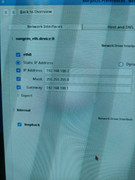
    3C16iup-Gf-OYv-Bkb-NHi-E1cn-Dq-Zra-Cx-Fd-Zb-QVU16i-Yc-WOm-MQREsr-Swt-Iq3uu7g-IM6OPCDZCa-I7x-B-L7d1x W4saw-Fn-AUxd-ECP1hmw-C68v-P-9TYQv-WGri-XCC2o-Rc-LTm-Te7jvc7oph-Slhk-Y-y1-XUmlu5s1Mk-Fyx-Tbyqn-Be-Pj

    Maybe I'm just setting something up wrong?

    [ Edited by olevenets 23.12.2025 - 16:29 ]
  • »23.12.25 - 16:28
    Profile
  • Caterpillar
    Caterpillar
    ChrisC
    Posts: 35 from 2025/3/1
    The ethernet ports on these desktops do not function as there is no driver.
    Power Mac G5 11,2 Dual 2GHz
    ATI X1950 Pro 256MB
    2GB RAM
    500GB Storage
    MorphOS 3.19 (Licenced)
  • »23.12.25 - 23:20
    Profile
  • MorphOS Developer
    jacadcaps
    Posts: 3252 from 2003/3/5
    From: Canada
    @ChrisC

    Sungem implies this is an AGP G5. We've got drivers for those.

    @olevenets

    How did you verify that it's (not)working? Try a ping to 192.168.100.1.
  • »24.12.25 - 00:42
    Profile Visit Website
  • Caterpillar
    Caterpillar
    ChrisC
    Posts: 35 from 2025/3/1
    Quote:

    jacadcaps wrote:
    @ChrisC

    Sungem implies this is an AGP G5. We've got drivers for those.

    @olevenets

    How did you verify that it's (not)working? Try a ping to 192.168.100.1.


    Eek, missed that bit
    Power Mac G5 11,2 Dual 2GHz
    ATI X1950 Pro 256MB
    2GB RAM
    500GB Storage
    MorphOS 3.19 (Licenced)
  • »24.12.25 - 08:07
    Profile